Summary: Data compliance typically includes a variety of requirements such as obtaining proper consent for data collection, implementing strong data security measures, ensuring the accuracy and completeness of data, and providing individuals with the right to access and control their own data. Google’s reCAPTCHA is the most-used CAPTCHA on the internet—but it’s not the safest, the most effective, or the most privacy compliant. This whitepaper describes the data collection and the privacy implications of GDPR compliance with reCAPTCHA, and it also provides the benefits and the alternative solutions that offer data privacy, integrity, and website security.
Overview
reCAPTCHA is a free service from Google that helps protect websites from spam and abuse. A “CAPTCHA” is a Turing test to tell humans and bots apart. It is easy for humans to solve, but hard for “bots” and other malicious software to figure out. By adding reCAPTCHA to a site, you can block automated software while helping your welcome users to enter with ease.

If you see a green checkmark, congratulations! You’ve passed our robot test (yes, it’s that easy). You can carry on with what you are doing. Sometimes we need some extra info from you to make sure you’re human and not a robot, so we ask you to solve a challenge:
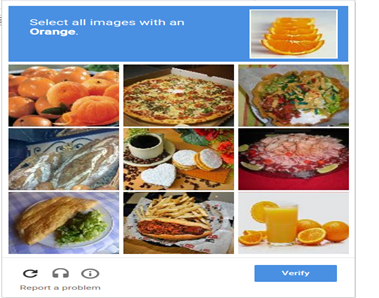
Simply follow the on-screen instructions to solve the puzzle and then carry on with your task.
Accessibility
reCAPTCHA works with major screen readers such as ChromeVox (Chrome OS), JAWS (IE/Edge/Chrome on Windows), NVDA (IE/Edge/Chrome on Windows) and VoiceOver (Safari/Chrome on Mac OS). reCAPTCHA will alert screen readers of status changes, such as when the reCAPTCHA verification challenge is complete. The status can also be found by looking for the heading titled “recaptcha status” in the “ReCAPTCHA widget” section of the page.
reCAPTCHA ARIA Status Messages
| Status message | Detailed description |
| ReCAPTCHA requires verification | The initial state, reCAPTCHA verification is required to proceed on this website. Click the checkbox to get a verification challenge. |
| Opening verification challenge | The checkbox has been clicked and a challenge is loading. You are instantly verified if the status changes to “You are verified”. Otherwise, you are required to complete a verification challenge. |
| The verification challenge expired, check the checkbox again for a new challenge | The verification challenge expired due to timeout or inactivity. Click the checkbox again for a new challenge. |
| You are verified | You have been verified. You can now proceed to the website. |
| Verification expired, check the checkbox again for a new challenge | The verification expired due to timeout or inactivity. Click the checkbox again for a new challenge. |
Reasons why your website needs a reCAPTCHA
- reCAPTCHA is a Turing test (a test to establish the existence of artificial intelligence) that helps to distinguish between human and automated access to websites. Here are some reasons why you might want to add reCAPTCHA to your website:
- Advanced security: reCAPTCHA protects and defends against spam and abuse.
- Ease of use: low friction, effortless interaction for your users.
- Creation of value: apply the human bandwidth to benefit people everywhere.
- Free: everyone can use this service free of charge.
- Different types of tests available and an option to use various tests for different kinds of forms.
- Help protect the integrity of your site by avoiding attacks that might spread malware or redirect your visitors to malicious sites.
reCAPTCHA helps to prevent bots from spamming website pages. It will always be beneficial to install this test to protect your site if you have open registration and comment sections.
However, the system does feature certain disadvantages as well. Here are some of the pros and cons of using reCAPTCHA on your site.
Pros
reCAPTCHA actively protects the integrity of your site by preventing spam, abuse, and data theft from bots.
Here are some of the most significant pros of using reCAPTCHA:
- Free. Everyone can use this service free of charge.
- Security. The test protects websites from spam, fraud, and abuse. This test is a very effective additional layer of security for websites with sign-up forms and comment sections.
- Options. There are different types of tests available and an option to use various tests for different kinds of forms.
- Integrity. Help protect the integrity of your site by avoiding attacks that might spread malware or redirect your visitors to malicious sites.
- Time. Save time by only providing services to real users. The test prevents bots from overflowing your business or comment section with fake users.
- Adaptive. As bots become more advanced, reCAPTCHA constantly adjusts its tests using a machine learning algorithm. This way, reCAPTCHA tests can adapt to what the bots are capable of doing.
Cons
While reCAPTCHA provides different options and ways to protect a site from spam and abuse, the test is not without its faults. Here are some of the cons of using the tool:
- User experience. The test interrupts the flow of what a user is trying to do, possibly resulting in a negative user experience. The test might even cause visitors to abandon the site altogether.
- Efficacy. Some bots can fool some of the older reCAPTCHA tests.
Google reCAPTCHA Privacy Policy
Protecting your company’s website from bot attacks is fundamental to securing sensitive data and maintaining availability. Many companies use Google reCAPTCHA for bot protection and to prevent data breaches. Google’s “invisible” reCAPTCHA collects and analyzes how users navigate your website to determine whether the activity is suspicious. While it might help mitigate risk arising from less sophisticated bots, it captures personal data that impacts your privacy compliance posture. More importantly, there is some uncertainty when it comes to how Google uses the data it gathers from this tool. To get and stay compliant, you need to have a reCAPTCHA privacy policy on your website that clearly provides users notice and enables them to opt out.
Since reCAPTCHA seeks to provide a better end user experience, it collects data that can identify some types of bot activity. From a high level, reCAPTCHA takes a snapshot of what you’re doing on a website, compares that information to what it knows about bot activity, and uses an algorithm to decide whether you’re a real person or not.
Types of Data ReCAPTCHA Collects:
- IP address
- Resources loaded, including styles or images
- User Google account information
- Behavior, like scrolling on a page, moving the mouse, clicking on links, time spent completing forms, and typing patterns
- Browser history
- CSS information
- Browser plug-ins
- Cookies
Over the last five years, more legislative bodies have implemented laws intending to protect data privacy. Although the European Union (EU) General Data Protection Regulation (GDPR) may be the most famous, at least five US states now have comprehensive data privacy laws.
Some examples of these laws include:
- California Consumer Privacy Act (CCPA), updated and renamed Consumer Privacy Rights Act (CPRA)
- Colorado Privacy Act
- Connecticut Personal Data Privacy and Online Monitoring
- Utah Consumer Privacy Act
- Virginia Consumer Data Privacy Act
- Further, privacy laws have been enacted globally, including:
- Brazil Lei Geral de Proteção de Dados Pessoais (LGPD)
- China Personal Information Protection Law (PIPL)
- Australia Privacy Act and the Australian Privacy Principles
- South Africa Protection of Personal Information Act (POPIA)
As countries adopt increasingly stringent privacy laws, companies need to understand their responsibilities to avoid fines and penalties. Recognizing the global move toward enforcing privacy laws, Google offers suggestions for establishing a basic privacy policy. According to Google, your privacy policy should include, at minimum, the following:
- What data you collect
- How you use the data
- What data you share
- Who you share data with
Google’s suggestions are a bare minimum requirement for what your privacy policy needs to include. Google mentions that you can consider addressing your information security practices, ways people can change or delete personal information, and data retention practices. Further, while reCAPTCHA may mitigate some risks, it lacks the ability to protect against sophisticated bot attacks and enables data sharing for marketing or business purposes. This implicates your privacy compliance posture, especially when it comes to the GDPR’s requirements.
Google recognizes and addresses some of these differences and limitations. For example, it specifies that you need to add an EU user consent policy that incorporates certain disclosures and consent language. For any Google products used on your website, including reCAPTCHA, you need to:
- Obtain consent to use cookies or other local storage.
- Obtain consent to collect, share, and use personal data to personalize advertising.
- Retain records of user consent.
- Provide clear instructions for how users can revoke consent.
- Identify each party that may collect, receive, or user personal data.
- Provide clear and easily accessible information about how those parties use personal data.
As such, to comply with the GDPR, you need to identify that you use Google’s reCAPTCHA and explain what that means to users. However, you can take actionable steps that enable you to achieve your compliance and data privacy goals. Your policy needs to clearly identify what your reCAPTCHA collects. It’s important to remember that when users are logged into their Google accounts, the reCAPTCHA collects that information as well—and users should be made aware of that. Some examples of data that you need to consider include:
- Referrer URL
- IP Address
- Operating system information
- Cookies
- Mouse and keyboard behavior
- Date and language settings
- JavaScript objects
- Screen resolution
Most comprehensive data privacy laws require you to minimize your data collection. Instead of collecting all the data, you need to collect only what you need. For example, the GDPR incorporates a “purpose limitation” requirement. Your reCAPTCHA policy should explain your reason for capturing the personal data. In this case, to mitigate data breaches caused by malicious bots.
To give consent, users need to know how you collect data. If you’re using reCAPTCHA, you need to consider all the places on your website where the technology collects user information, including:
- Cookies
- Forms
- Surveys
- Registration pages
- Newsletter signup pages
- Link clicks
Since reCAPTCHA sends data to Google, you don’t know exactly where the information is stored. You need to make sure that you explain this, especially if you have to comply with data residency requirements. Additionally, you should also explain that you don’t know how long Google stores the
data. Your website is dynamic, and your privacy policy may change over time. Most importantly, you may choose to change how you use information. You need to tell users how you plan to let them know about these changes so they have the option to revoke consent. You may choose to email them or post a privacy policy modification date on your website.
Cybersecurity and data privacy are interconnected. Privacy requires you to gain user consent and ensure only authorized users access personal data. If malicious actors gain unauthorized access, you have a data security and privacy issue. Your privacy policy should outline your information protections, including:
- Computer safeguards
- Physical access controls
- Website and application security controls, like activating SSL
- Alternative ways to provide confidential data
Finally, Since reCAPTCHA sends the data to Google, users may need to contact Google Support to have all their data deleted. You can also explain how they can minimize the data the reCAPTCHA sends by suggesting:
- Logging out of their Google accounts
- Deleting history
- Deleting cookies
Ruling: reCAPTCHA Uses Data for Purposes Other Than Security
Google’s reCAPTCHA is the most-used CAPTCHA on the internet—but it’s not the safest, the most effective, or the most privacy compliant. The French privacy commission (CNIL) has determined officially that reCAPTCHA uses excessive personal data for purposes other than security, which affects the privacy of end-users that interact with websites and apps using reCAPTCHA. Because reCAPTCHA is not automatically GDPR compliant, any company subject to GDPR that is using reCAPTCHA must bridge the gap by providing very clear information to end-users about what data is gathered for what purposes, and where the data is sent and stored.
ReCAPTCHA & GDPR
The foundational idea behind GDPR is that user data across the internet should be private and protected—and not gathered unless for a specific purpose known to the data subject. On top of that, before a user’s data is collected, they should be told exactly what details will be gathered, and they should be given an option to opt out of the data collection.
Since 2020, CNIL has been investigating how reCAPTCHA is using data, and whether or not the businesses using reCAPTCHA on their websites are properly informing users and asking for consent. Google itself does not clearly define the purpose for which reCAPTCHA collects user data (which includes IP address, cookies deposited by Google in the last six months on the device, and a list of plugins), and there has been speculation that the data could be sent to Google Analytics (a marketing platform), among other possible uses.
Google does note that companies need to inform and obtain consent from end-users to process their data, but it does not provide or enforce such notifications. In essence, companies that use reCAPTCHA are responsible for ensuring that the gathering of user consent is “free, specific, informed, and unambiguous” per GDPR requirements. Obtaining consent is challenging because the purpose of the data collection is not fully defined or understood—so consent cannot be fully informed.
The best way to protect your website, mobile app, and/or API is by leveraging a solution that does not gather unnecessary data and, more importantly, only uses the data processed for security purposes. A traditional CAPTCHA, like reCAPTCHA, that uses data for reasons other than security must allow end-users to opt out in order to be GDPR compliant—which bots can use as a loophole to bypass the challenge. The following qualities are essential in a GDPR-compliant CAPTCHA solution:
- Transparency on data collection, storage, and retention.
- Highest security and encryption standards.
- Exemption from end-user consent and opt-out requirements (thanks to transparency around minimal data collection and use for security purposes only).
Your bot and fraud protection provider should guarantee that they only process data for security purposes, and that they adhere to the highest data processing standards and best practices.
reCAPTCHA alternatives
Bots can reach up to any website and start submitting forms with spam and other such unwanted content. Hence that’s the reason the websites need a reCAPTCHA. Some More Reasons Why Your Website Needs a CAPTCHA:
- Stops brute force attacks on your online accounts.
- Stops from multiple email signups.
- Makes your online shopping process more secure.
- Helps you get rid of dodgy comments and links on your blogs and websites.
- It helps in protecting the integrity of online polls by stopping hackers and bots from sending false responses.
reCAPTCHA is a viral form creator developed by Google, with the help of getting rid of bots from our websites and blogs. But in various conditions, it was figured out that the reCAPTCHA becomes unresponsive during heavy traffic on your website and the raised a lot of legal issues with data privacy. Another reason to look for a reCAPTCHA alternative is to get more human-friendly options that offer better illustrations, and users spend less time getting on the website safely.
Features reCAPTCHA Alternative Plugin Must Have
reCAPTCHA comes with amazing features, support, and the reliability of Google, but there are plenty of alternatives to reCAPTCHA who are offering way more than that we get with reCAPTCHA. The following are some of the features reCAPTCHA alternatives tools must have:
- The reCAPTCHA alternative should offer more user-friendly options that lead to an enhancement in the user experience.
- Alternatives should have features like better integrations. Most of the websites are developed using WordPress, so integrations to WP forms & other popular CMS is a must.
- Safety should always be your number one priority. So always have a look at the security feature reviews.
- Make sure the alternative you pick is easy to use for humans and hard for bots.
- Eliminate data collection that can easily violate privacy acts.
The following are the reCAPTCHA Alternatives Software
- hCaptcha – Protecting your website and your privacy from hackers, spammers and bots is the major reason behind the hCaptcha plugin’s development. Most of the CAPTCHA form creators protect your website from bots and other such stuff but, unfortunately, are unable to protect your own privacy and personal data. Along with that hCaptcha offers you complete support regarding its integration with WPForms, this will add extra security to your WPForms and keep them away from bots. hCaptcha offers features like:
- Provides a privacy-focused solution that filters out bots from your websites, blogs, and forms.
- Accurate results are something that you are going to get every time with hCaptcha.
- The plugin enhances your user experience by being easy to use and fitting your requirements entirely.
Pros:
- More privacy-focused solution
- Offers a human-friendly touch for a better user experience
- Accurate results every time
- Supports integration for WP-forms
hCaptcha comes with two different plans:
- Free plan: It’s specially designed for single users/publishers that offers all the required features.
- Paid plan: This is a plan developed for enterprises with extra add-on features and support.
- 2. The Honeypot Method – The honeypot method is a more technical method, as we need to completely write the code to set it up to protect your website from bots and spam. Moreover, you don’t need to pick up a particular plugin or tool for getting started with this bots protection or CAPTCHA method. There are no plans; you can directly install the plugin and use this method to protect your website using various languages like HTML, CSS, JavaScript, and more.
Pros:
- Offers robust protection
- Customizable
- It comes with various integrations like multiple network connections, spam traps, and more…
- Invisible to most users.
- Can stop simple bots.
Cons:
- Completely technical
- Requires coding knowledge
- Doesn’t stop the most dangerous or persistent bots.
- Confusing for people with screen reader software.
- 3. Really Simple CAPTCHA – is one of the most widely used WordPress plugins with more than +1 million active installs. Really Simple CAPTCHA, as its name indicates is quite “simple” in nature. This plugin doesn’t work alone and was originally created for Contact Form 7, although, now you can use it with other plugins as well. It is an Open-Source and uses temporary files.
Pros:
- Easily installed plugin.
- Really Simple CAPTCHA uses temporary files instead of PHP ‘Sessions’ for storing states.
- Supports more than 30 Languages.
Cons:
- No “control panel” available for this plugin.
- Although it’s easy to use, many users have still complained that they receive spam.
4.Antispam Bee – is the next best choice after Akismet and can work as a blessing to help you deal with spammers. The plugin is actively developed by a team of German developers- Pluginkollektiv. The best feature of this plugin is that it entirely works without Captchas and doesn’t send your personal data to third parties. Antispam bee works with algorithms and filters out unwanted entries, spam comments & trackbacks effectively. Unlike Akismet, this plugin doesn’t require registration and is completely free to use for both personal and commercial use. The plugin is 100% GDPR compliant and comes with a ton of excellent features.
Pros:
- Clears your WordPress database of spam after a specified number of days.
- This plugin offers spam statistics in your dashboard monthly.
- Notify admins by e-mail about incoming spam.
Cons:
- Antispam bee only works with native WordPress comments.
5.Akismet Spam Protection – is the most reliable alternative to reCAPTCHA, with the help of which you can put a full stop on almost every kind of spam and bots entry to your website.
Pros:
- Easy to use
- Reliable spam protection
- Customer support is extremely helpful.
Cons:
- Higher charges on plans
6.Bots With an Advanced Bot Protection Solution – The best alternative to a traditional, siloed CAPTCHA is an advanced bot protection solution that protects 99.99% of your real users without ever showing them a CAPTCHA. The solution must operate and learn in real time at the edge, without frustrating your users or requiring any extra work from your team.
Pros:
- Protects against the most advanced bots.
- Easy to integrate with your existing tech architecture.
- Requires minimal maintenance or upkeep.
- Respects global data privacy regulations.
Coms:
- Doesn’t come free.
7.Blocking Basic Bots With a WAF – A Web Application Firewall (WAF) only protects against the most familiar security threats, such as cross-site scripting, SQL injections, and session hijacking. They are no longer adequate protection for today’s sophisticated bots. Bots now mimic human behavior and can rotate between thousands of IPs, easily avoiding the IP-centric, static rules of a WAF.
Pros:
- Protects against some security threats.
- Familiar technology for security specialists.
Cons:
- Doesn’t protect against sophisticated bots.
- Relies too heavily on IP-centric, static rules.
- 8.Using Multi-Factor Authentication (MFA) – Particularly if users can create accounts on your websites or apps, encouraging them to toggle MFA can serve as a great security measure. The trouble is, you cannot force your users to toggle MFA. They have to do it themselves. This means that a large percentage of your user-base simply won’t use it. It’s too much friction. Additionally, while MFA can protect your users against credential stuffing attacks and account takeover, it does nothing to protect your platform or users against other types of attacks, such as web scraping or DDoS.
Pros:
- Among the better CAPTCHA “alternatives”.
- Easy to install and inexpensive.
Cons:
- Adds significant friction to your UX.
- Many of your users will not toggle it on.
- Only protects against very specific bot attacks.
Conclusion: Protecting your company’s website from bot attacks is fundamental to securing sensitive data and maintaining availability. Many companies use Google reCAPTCHA for bot protection and to prevent data breaches. However, reCAPTCHA privacy policy necessary to avoid the violation of the European Union (EU) General Data Protection Regulation (GDPR) and other Privacy law acts in US & Canada.
The French privacy commission (CNIL) has officially declared what many data privacy enthusiasts have long speculated: reCAPTCHA gathers excessive customer data and does not disclose exactly why or how it is used. Any business using reCAPTCHA for protection is subject to user privacy concerns and data breaches—all without being adequately protected against malicious bots (which easily bypass the challenges).
Finally, the best way to minimize your data privacy risk is to choose a fully privacy-compliant CAPTCHA (for example, DataDome’s bot protection and GDPR compliant CAPTCHA solution protect customer data and privacy).
 Bryan Soliman Blog
Leave a comment