Both Azure Functions and Data Factory facilitate the user to run serverless, scalable data operations from multiple sources and perform various customized data extraction tasks.
Data Factory Reference Architecture
Open the Azure portal, go to Azure data factory (V2). Select Create pipeline. Choose to Execute SSIS Package activity. Configure the activity in the Settings. **Make sure you have given the right package path from SSISDB Then select the Trigger option in the pipeline for executing the package. The SSIS Package gets executed through the pipeline.

Azure Function App Reference Architecture

Web application backends the retail scenario: Pick up online orders from a queue, process them, and store the resulting data in a database.
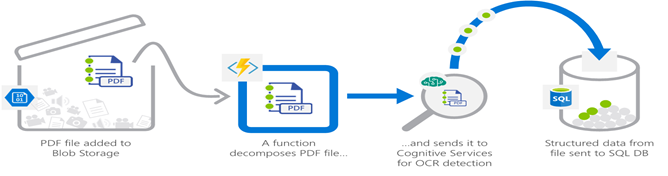
Real-time file processing for the healthcare scenario: The solution securely uploads patient records as PDF files. The solution then decomposes the data, by processing it using OCR detection, and it adds the data to a database for easy queries.

Real-time stream processing for the independent software vendor (ISV) scenario: A massive cloud app collects telemetry data. The app processes that data in near real-time and stores it in a database for use in an analytics dashboard.
Azure Functions – Azure Functions are event-driven, compute-on-demand Platform as a Service, or PaaS experience that populates the Azure platform with capabilities to implement code or tasks triggered by events occurring in Azure or third-party service as well as on-premises systems. Azure Functions facilitates the developers by connecting to various data sources or messaging solutions to retrieve the status of tasks, and processes, and react to such events (or) triggers. Functions work on a Server-less framework and hence the user gets to work with the platform-provided pre-configured operating system images, which lessens the burden of any patching or maintenance. Being a serverless service Functions can be auto-scaled based on the workload. Functions sometimes are the fastest way to turn an idea into a working application. Azure Functions sound and work a lot like AWS Lambda and Cloudwatch.

A basic Azure Function is made up of mainly 3 components – Input, Output and Trigger
Input: The Input of the function can be anything like Azure Blob Storage, Cosmos DB, Microsoft Graph Events, Microsoft One Drive files, Mobile Apps, etc.
Output: The Output of the Functions can be any data storage service or a web application depending on the output or the result of the executed function like Azure SQL Database or Power BI etc.
Trigger: A trigger is an event or action that wakes up the function based on a defined set of rules like pre-defined scheduling using CRON expressions, or changes to the Storage containers, messages from Web Apps, and HTTP triggers.
What are some advantages of using Azure Functions?
- They are scalable: Being a serverless configuration the function is auto-scaled depending on the workloads, which helps in lowering usage costs by Paying for only what the user consumes.
- Wide range of triggers and connectors for 3rd Party Integrations: Can be integrated to work with most 3rd Party Applications and APIs.
- Open-Source: Being an open-source tech stack the Functions can be hosted anywhere on Azure or in your own Datacenter or cloud.
- Support for Multiple Programming Languages: Azure Functions’s Runtime-Stack supports codes in a variety of languages including JavaScript, Python, C#, and PHP, as well as scripting options like PowerShell or Bash.
- Other Productivity features also include Deployment Slots, Easy-Auth etc.
Examples of a few types of Azure Functions:
- Schedule Sending of Serverless Emails using Python or any other Language using CRON expressions.
- Running SQL Queries to perform table operations in Databases.
Limitations:
- Users are required to be proficient in coding to create, code, and configure Functions to suit our needs.
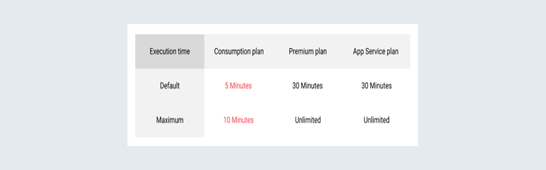
- Azure Functions have a limit on the execution times of the functions depending on the Subscription of the user.
- Azure Data Factory – the data migration service offered by Microsoft Azure, helps users build scalable and automated ETL or ELT Pipelines. An ETL Pipeline refers to the series of events or processes implemented to Extract data from various data storage systems Transform the extracted data to desired formats, and load the resultant transformed datasets into various output destinations like databases or data warehouses for analytics reporting, etc. While there are many ETL solutions that can run on any infrastructure, this is very much a native Azure service and easily ties into the other services Microsoft offers. Azure Data Factory is more of an Extract-Load (EL) and Transform-Load (TL) process, unlike traditional ETL processes.
- Native ETL methods require the user to write these codes from scratch using scripting languages like Python, Perl, or Bash to perform the ETL Processes. These processes may sometimes become tedious mainly when dealing with large databases consisting of multiple schemas and tables. Azure Data Factory or ADF facilitates the users to set up such complicated and time-consuming ETL processes by eliminating the hurdle of writing long lines of code.
Major Components of ADF:
The following list makes up the major structural blocks of ADF that work together to define and execute an ETL Workflow:
- Connectors or Linked Services: Linked services provide the user with configuration settings to connect, extract, or read/write from numerous data sources. Depending on the job, each data flow can have multiple linked services or connectors.
- Datasets: Datasets contain the data source configuration settings on a more granular level which can include a database schema, a table name or file name, structure, etc. Each of the datasets refers to a certain linked service and that linked service in turn determines the list of all possible properties of the input and output datasets.
- Activities: Activities are the actions employed by the user to facilitate data movement, transformations, or control flow actions.
- Pipelines: Pipelines consist of multiple activities bundled together to perform a desired task. A data factory can have multiple functioning pipelines. Using pipelines makes it much easier to schedule and monitor multiple logically related activities.
Types of Triggers used with ADF Include:
- Schedule Trigger: A trigger that invokes a pipeline on a time-based schedule.
- Tumbling Window Trigger: A trigger to facilitate the execution of operations periodically.
- Event-based Trigger: An event-based trigger executes the pipelines in response to an event, such as the arrival of a file, or the deletion of a file, in Azure Blob Storage.
ADF Integration Runtime (RI):
The Integration Runtime (IR) infrastructure used by ADF facilitates data movement, and compute capabilities across different network environments. The runtime types available are:
- Azure IR: Azure IR provides a fully managed, serverless compute environment in Azure and plays a major role in the data movement activities in the cloud.
- Self-hosted IR: This service manages copy activities between public cloud network data stores and data stores in private networks.
- Azure-SSIS IR: SSIS IR is required to natively execute SSIS packages. The below-attached image shows the relationships among different components of ADF:

Advantages of using ADF:
- Serverless Infrastructure: ADFs are able to run completely within Azure as a native serverless solution. This eliminates the mundane tasks of maintenance and updating of software and packages. The definitions and schedules are simply set up and then the execution is handled.
- Connectors: ADF Supports integration with multiple 3rd Party Services with the help of the connectors offered by Azure.
- Minimal Coding Experience: The Data Factory provides the user with an UI to perform all the data mapping and transformation tasks on datasets from various inputs. In turn facilitates users even with no coding background to set up complicated ETL data flows.
- Scalability: ADF also allows the use of parallelism while keeping your costs to only what is used. This scaling benefits the user when time is of the essence; one server for 6 hours or 6 servers for one hour costs the same, but accomplishing the task in 1/6th of the time.
- Programmability: ADF has many programming functionalities such as loops, waits, and parameters for the whole pipeline.
- Utility Computing: The user only pays for what is used, there are no times with idle servers cost money without producing anything, and it can be scaled up when or if needed.
- Supports long and time consuming(>10 min) Queries.
Limitations of ADF:
- ADF allows programmability like loops, wait, and parameters in the pipelines but this is no match to the flexibility offered by a native ETL code with the help of Python for example.
- Even though the UI offered by Azure for designing the pipelines eliminates the task of coding, it eats up the time taken to familiarize with the UI.
When to use Azure Functions or Azure Data Factory
The following is a summary of some basic differences in the resources and computation offered by both services:
Azure Functions:
- Customisable with the help of Code.
- Better for short-lived instances (< 10 min) in case of a basic Consumption Plan.
Azure Data Factory:
- Customisable but not as flexible as the customization offered by coding in a scripting language.
- Supports long-running queries or tasks.
- Supports multiple data sources and tasks in a single pipeline.
Finally, if the data load is low or the task doesn’t consume a lot of time then the better service to choose would be Azure Functions, as the cost would be lower compared to a pipeline setup.
Note that a single instance of Azure Function running multiple times a day will incur extra costs. Otherwise, If the data to be extracted is large and time-consuming and/or the user is not so proficient in scripting, I would suggest the user opt for the Azure Data Functions as it is clearly the better option out of these two.
Azure Data Factory with Azure Functions:
To strengthen the ADF service and overcome the limitations in the customization, Microsoft has introduced a feature that helps in integrating Azure Functions as a part of an ADF Pipeline basically making Azure Functions a subset of ADF. So code written in any one of the supported scripting languages can be bundled as an Azure Function and included with the ADF Pipeline to perform the desired data operations.

How to Execute Azure Functions From Azure Data Factory
Azure Functions is one of the latest offerings from Microsoft to design pipelines handling ETL / Processing Operations on Big Data. Azure Data Factory V2 supports more options in Custom Activity via Azure Batch or HDInsight which can be used for complex Big Data or Machine Learning workflows, but the V1 does not have the mechanism to call the function directly.
However, it does not have a straightforward mechanism to integrate Azure Functions into the Workflow as an activity. Azure Functions is a Serverless PAAS offering from Microsoft that helps in running Serverless applications/scripts in multiple languages like C#, JavaScript, Python, etc. Azure functions are scalable and can be used for any purpose by writing Custom application logic inside it and it is simple to use.
Scenario 1: Trigger-based calling of Azure Functions

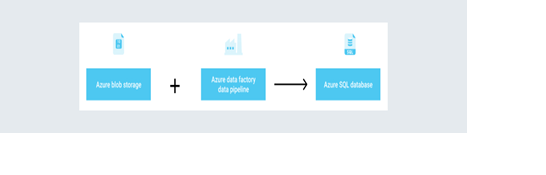
The first scenario is triggering the Azure functions by updating a file in the Blob Storage. The trigger can be setup in the Azure Functions to execute when a file is placed in the Blob Storage by the Data Factory Pipeline or Data Factory Analytics (U-SQL).
Scenario 2: HTTP Trigger

By exposing the Functions in the HTTP trigger and using it as an HTTP Data source in Azure Data Factory. The Function can be executed like a copy activity triggering the http URL of the function. This approach is more useful when any response is needed from the functions after processing.
Finally, The Azure functions can be a good driver in enabling advanced processing operations along with the Data Factory Pipeline.
 Bryan Soliman Blog