Overview
A chatbot is a software program that simulates a conversation between a human and a computer. When asked a question, a chatbot responds using a knowledge database. Artificial intelligence (AI) software is used to simulate a conversation or a chat in natural language. This is carried out through a messaging platform on a website, a mobile app or through the telephone.
Chatbots enable communication between a human and a machine. They are designed to work independently from human assistance and respond to questions using natural language processing (NLP). This is a branch of artificial intelligence that provides computers with the ability to understand text and spoken words in much the same way that a human being can.
Chatbots make it easy for a user to find answers to questions and requests through text, audio, or both – without the need for human intervention. Bots are an automated solution that allows your business to handle multiple customer queries at the same time. According to the statistics, business absolutely needs to be available 24/7. Chatbots have quickly integrated more rules and natural language processing and the latest types are able to learn as they’re steadily exposed to more human language. Today’s AI chatbots use advanced AI tools to establish what the user is trying to achieve. There are mainly two categories of chatbots:
Rule-based chatbots – These bots can only understand a limited number of choices they have been programmed with. They offer the following benefits:
- They are simpler to build because they work on a true-false algorithm to understand a customer’s query and come up with a relevant answer.
- They are easier to implement since they don’t need extensive training.
- It’s easier to control the answers they output, as they are set up by the brand/company.
However, they have serious downsides:
- They rely on predefined rules and can’t understand meaning
- They work based on buttons. This means the chatbot shows a series of options the user needs to choose from, which makes it really difficult to really know the true intent of the user, as it might not be represented on the options.
AI-based chatbots – These chatbots are sophisticated because they are equipped with artificial intelligence (AI). Using Natural Language Processing (NLP) and semantics, they respond to open-ended queries. AI chatbots can identify language, context, and intent and respond accordingly. They are a far more complex type of chatbot.
- Probabilistic chatbots – This type of bot uses end-to-end machine learning to create models based on historical conversation logs, rather than via intent detection and looking up a relevant response in a knowledge base. Despite the fact that they don’t stick to a fixed script and they can be quite natural to interact with, they have several downsides:
- As they learn from experience and data from conversations, a lot of biases can be introduced. There is limited control over the output conversations, and the brands can be liable in case of inappropriate behavior of the bot.
- A lot of training data is needed to implement and launch a probabilistic chatbot, as the more data it gets, the better it tends to perform, which makes implementations long and painful.
- The decisions made by the chatbot happen in what is known as a ‘black box’ which means there is no transparency whatsoever regarding how the chatbot came to a decision, and it’s hard to modify or tweak its behavior.
- Deterministic chatbots –This type of chatbot uses a different kind of AI, and leverages Natural Language Processing to calculate the weight of every word, to analyze the context and the meaning behind them in order to output a result or answer. These chatbots are able to match the intents to an answer based on meaning.
They have their benefits and downsides:
- They only output content populated by the brand, which makes it easier to control the tone of voice and the brand image of the company.
- They don’t learn based on probability but can give hints on new hot topics to be included.
- They follow a deterministic decision tree to guide customers to the desired outcome. This tree can be very complex but is overseen and controlled by the company, and not open to wild, unwanted answers.
- Whenever there isn’t a relevant piece of content in the knowledge base to respond to the user, they will ask them to reformulate or they will escalate the case to a live agent, creating a smooth transition and reducing friction.

Reference Architecture for Azure Bot Framework
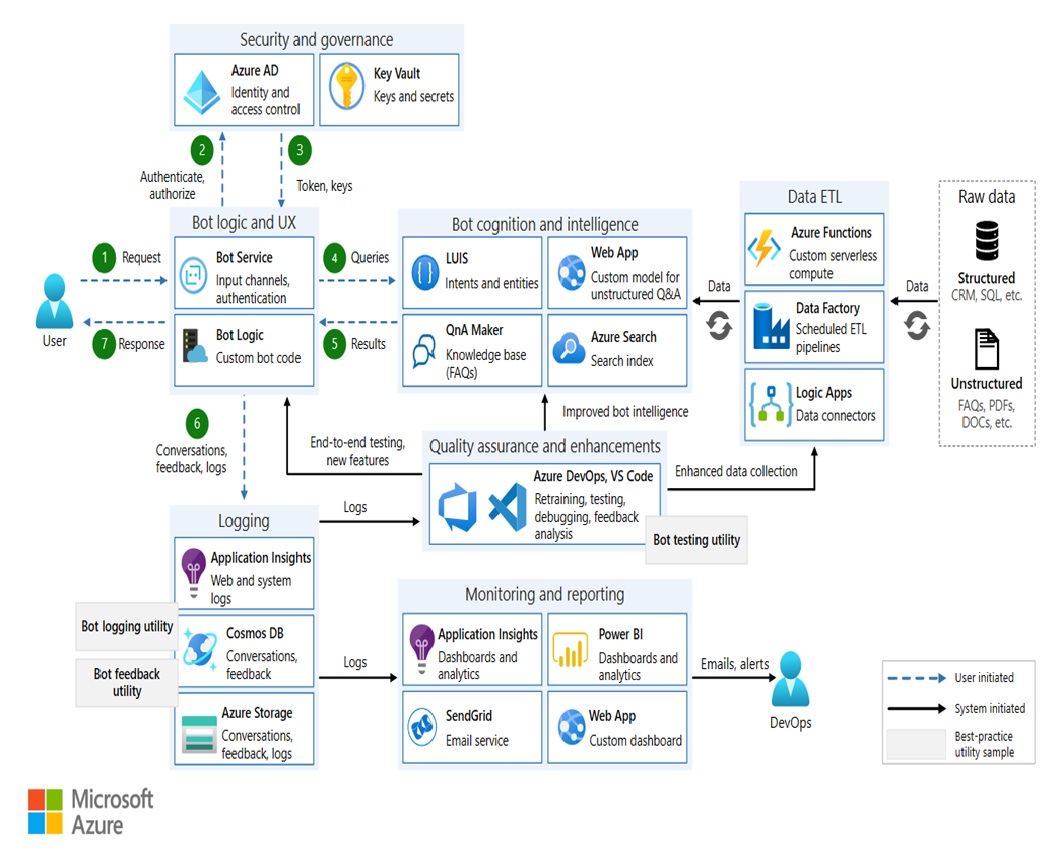
This reference architecture describes how to build an enterprise-grade conversational bot (chatbot) using the Azure Bot Framework.
Workflow – The architecture shown above uses the following Azure services:
Components
- Bot Framework Service
- Azure App Service
- Azure Cognitive Services
- Azure Search
- Azure Data Factory
- Azure Logic Apps
- Azure Functions
- Application Insights is a feature of Azure Monitor
- Azure Blob Storage
- Azure Cosmos DB
- Azure AD
- Azure Key Vault
Your own bot may not use all of these services or may incorporate additional services.
Bot logic and user experience
- Bot Framework Service (BFS). This service connects your bot to a communication app such as Cortana, Facebook Messenger, or Slack. It facilitates communication between your bot and the user.
- Azure App Service. The bot application logic is hosted in Azure App Service.
Bot cognition and intelligence
- Language Understanding (LUIS). Part of Azure Cognitive Services, LUIS enables your bot to understand natural language by identifying user intents and entities.
- Azure Search. Search is a managed service that provides a quick searchable document index.
- QnA Maker. QnA Maker is a cloud-based API service that creates a conversational, question-and-answer layer over your data. Typically, it’s loaded with semi-structured content such as FAQs. Use it to create a knowledge base for answering natural-language questions.
- Web app. If your bot needs AI solutions not provided by an existing service, you can implement your own custom AI and host it as a web app. This provides a web endpoint for your bot to call.
Data ingestion
The bot will rely on raw data that must be ingested and prepared. Consider any of the following options to orchestrate this process:
- Azure Data Factory. Data Factory orchestrates and automates data movement and data transformation.
- Logic Apps. Logic Apps is a serverless platform for building workflows that integrate applications, data, and services. Logic Apps provides data connectors for many applications, including Office 365.
- Azure Functions. You can use Azure Functions to write custom serverless code that is invoked by a trigger — for example, whenever a document is added to blob storage or Azure Cosmos DB.
Logging and monitoring
- Application Insights. Use Application Insights to log the bot’s application metrics for monitoring, diagnostic, and analytical purposes.
- Azure Blob Storage. Blob storage is optimized for storing massive amounts of unstructured data.
- Azure Cosmos DB. Azure Cosmos DB is well-suited for storing semi-structured log data such as conversations.
- Power BI. Use Power BI to create monitoring dashboards for your bot.
Security and governance
- Azure Active Directory (Azure AD). Users will authenticate through an identity provider such as Azure AD. The Bot Service handles the authentication flow and OAuth token management.
- Azure Key Vault. Store credentials and other secrets using Key Vault.
Quality assurance and enhancements
- Azure DevOps. Provides many services for app management, including source control, building, testing, deployment, and project tracking.
- VS Code. A lightweight code editor for app development. You can use any other IDE with similar features.
Potential use cases – This solution is ideal for the telecommunications industry. This reference architecture covers the most essential design aspects, and introduces the tools needed to build a robust, secure, and actively learning bot.
Recommendations
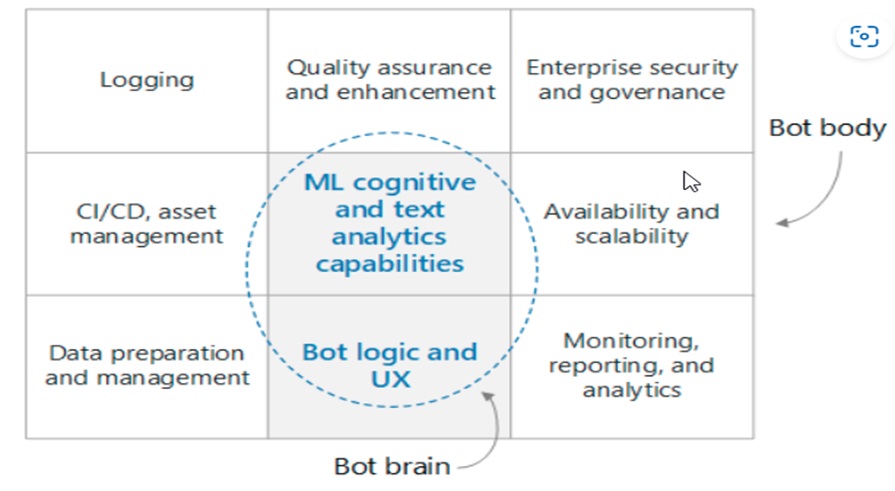
At a high level, a conversational bot can be divided into the bot functionality (the “brain”) and a set of surrounding requirements (the “body”). The brain includes the domain-aware components, including the bot logic and ML capabilities. Other components are domain agnostic and address non-functional requirements such as CI/CD, quality assurance, and security.
Data Flow of each Subcomponent
a. User message flow
Authentication – Users start by authenticating themselves using whatever mechanism is provided by their channel of communication with the bot. The bot framework supports many communication channels, including Cortana, Microsoft Teams, Facebook Messenger, Kik, and Slack. When you create a bot with Azure Bot Service, the Web Chat channel is automatically configured. This channel allows users to interact with your bot directly in a web page. You can also connect the bot to a custom app by using the Direct Line channel. The user’s identity is used to provide role-based access control, as well as to serve personalized content.
User message – Once authenticated, the user sends a message to the bot. The bot reads the message and routes it to a natural language understanding service such as LUIS. This step gets the intents (what the user wants to do) and entities (what things the user is interested in). The bot then builds a query that it passes to a service that serves information, such as Azure Search for document retrieval, QnA Maker for FAQs, or a custom knowledge base. The bot uses these results to construct a response. To give the best result for a given query, the bot might make several back-and-forth calls to these remote services.
Response – At this point, the bot has determined the best response and sends it to the user. If the confidence score of the best-matched answer is low, the response might be a disambiguation question or an acknowledgment that the bot could not reply adequately.
Logging – When a user request is received or a response is sent, all conversation actions should be logged to a logging store, along with performance metrics and general errors from external services. These logs will be useful later when diagnosing issues and improving the system.
Feedback – Another good practice is to collect user feedback and satisfaction scores. As a follow up to the bot’s final response, the bot should ask the user to rate their satisfaction with the reply. Feedback can help you to solve the cold start problem of natural language understanding, and continually improve the accuracy of responses.
b. System Data Flow
ETL – The bot relies on information and knowledge extracted from the raw data by an ETL process in the backend. This data might be structured (SQL database), semi-structured (CRM system, FAQs), or unstructured (Word documents, PDFs, web logs). An ETL subsystem extracts the data on a fixed schedule. The content is transformed and enriched, then loaded into an intermediary data store, such as Azure Cosmos DB or Azure Blob Storage. Data in the intermediary store is then indexed into Azure Search for document retrieval, loaded into QnA Maker to create question and answer pairs, or loaded into a custom web app for unstructured text processing. The data is also used to train a LUIS model for intent and entity extraction.
Quality assurance – The conversation logs are used to diagnose and fix bugs, provide insight into how the bot is being used, and track overall performance. Feedback data is useful for retraining the AI models to improve bot performance.
Building a bot
Before you even write a single line of code, it’s important to write a functional specification so the development team has a clear idea of what the bot is expected to do. The specification should include a reasonably comprehensive list of user inputs and expected bot responses in various knowledge domains. This living document will be an invaluable guide for developing and testing your bot.
Ingest data
Next, identify the data sources that will enable the bot to interact intelligently with users. These data sources could contain structured, semi-structured, or unstructured data sets. When you’re getting started, a good approach is to make a one-off copy of the data to a central store, such as Azure Cosmos DB or Azure Storage. As you progress, you should create an automated data ingestion pipeline to keep this data current. Options for an automated ingestion pipeline include Data Factory, Functions, and Logic Apps. Depending on the data stores and the schemas, you might use a combination of these approaches.
Core bot logic and UX
The core bot logic is the code that handles the conversation with the user, including the routing logic, disambiguation logic, and logging. Start by familiarizing yourself with the Bot Framework, including:
Once you have a specification and some data, it’s time to start making your bot into reality. Let’s focus on the core bot logic. This is the code that handles the conversation with the user, including the routing logic, disambiguation logic, and logging. Start by familiarizing yourself with the Bot Framework, including:
- Basic concepts and terminology used in the framework, especially conversations, turns, and activities.
- The Bot Connector service, which handles the networking between the bot and your channels.
- How conversation state is maintained, either in memory or better yet in a store such as Azure Blob Storage or Azure Cosmos DB.
- Middleware, and how it can be used to hook up your bot with external services, such as Cognitive Services.
For a rich user experience, there are many options.
- You can use cards to include buttons, images, carousels, and menus.
- A bot can support speech.
- You can even embed your bot in an app or website and use the capabilities of the app hosting it.
To get started, you can build your bot online using the Azure Bot Service, selecting from the available C# and Node.js templates. As your bot gets more sophisticated, however, you will need to create your bot locally then deploy it to the web. Choose an IDE, such as Visual Studio or Visual Studio Code, and a programming language. SDKs are available for the following languages:
- C#
- JavaScript
- Java (preview)
- Python (preview)
As a starting point, you can download the source code for the bot you created using the Azure Bot Service. You can also find sample code, from simple echo bots to more sophisticated bots that integrate with various AI services.
 Bryan Soliman Blog
Leave a comment